Your career, from the terminal.
Search jobs, update your CV and chat with the Tabbio agent without leaving the command line. It works on your Tabbio account, with the same data and approvals as the app.
npx @tabbio/cli loginNeeds Node.js 20 or newer and a Tabbio account.
Prefer an MCP client? Connect Claude, ChatGPT or Cursor
tabbio
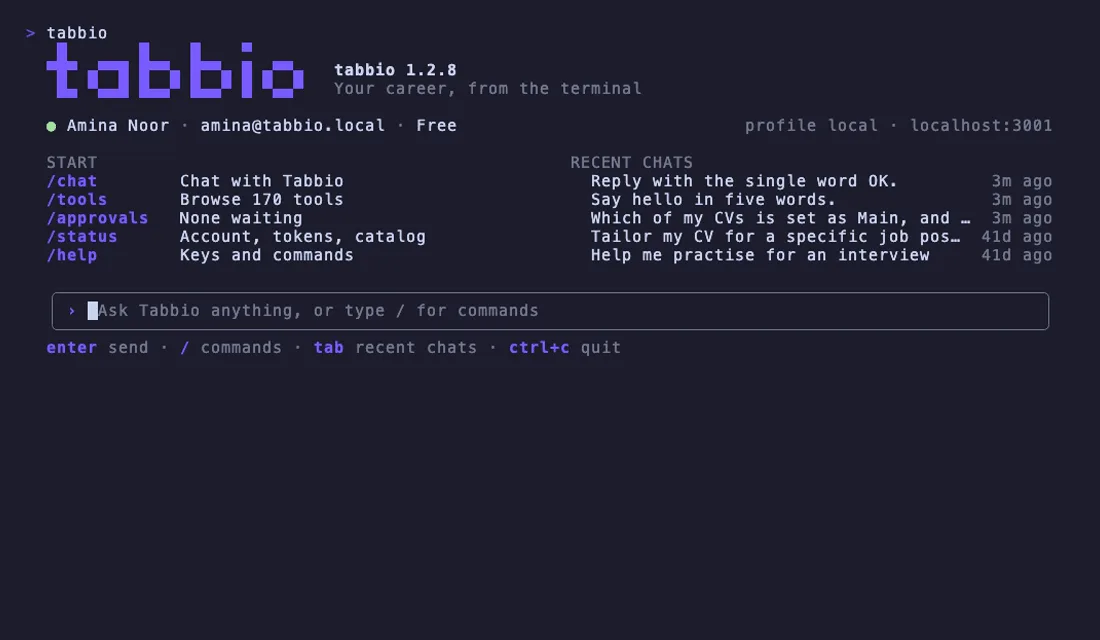
What you can do from the terminal
The CLI reaches the same 162 tools as the Tabbio MCP server, plus chat, approvals and output your scripts can read.
- 01
Every tool is a command
Each tool becomes a command such as
tabbio cv list, with flags built from the tool's own schema. Browse them in an interactive list, or print one tool's flags withtabbio tools describe.cv listcatalog job-searchprofile updatecv tailor - 02
Chat with the Tabbio agent
tabbio chatstreams the answer as it is written, shows each tool the agent calls and keeps your threads. Slash commands switch mode, model and thread, and, where your account has them, turn on web research, images, or an answer as a document, slides or a page.tabbio chat/threads/research on--result document - 03
Approve in the terminal
Actions that send, share, publish or delete stop for your approval. The CLI shows the tool and its arguments, and you approve, reject or leave it pending.
--yesapproves only what that one command created.approvalsapprovals approveapprovals wait--yes - 04
Scripts and CI
--jsonprints a stable envelope with a schema version. Piped output becomes tab-separated rows, exit codes say what happened, andTABBIO_TOKENsigns a job in without writing anything to disk.--json--fieldsTABBIO_TOKENhelp exit-codes - 05
A bridge for MCP clients
Some MCP clients only start local servers.
tabbio mcp servespeaks MCP over stdin and stdout and forwards every call to Tabbio with your CLI sign-in. Clients that support remote servers can taketabbio mcp urlinstead.mcp servemcp url - 06
One sign-in, three ways
Approve the computer in your browser, use a code sent by email over SSH, or bring a personal token for CI. Credentials sit in a file only you can read (mode 0600), tokens are never printed,
tabbio logoutends the session, and approvals still apply.loginlogin --emaillogin --with-tokenlogout
How the Tabbio CLI looks
Real frames from the CLI, captured on a test account.
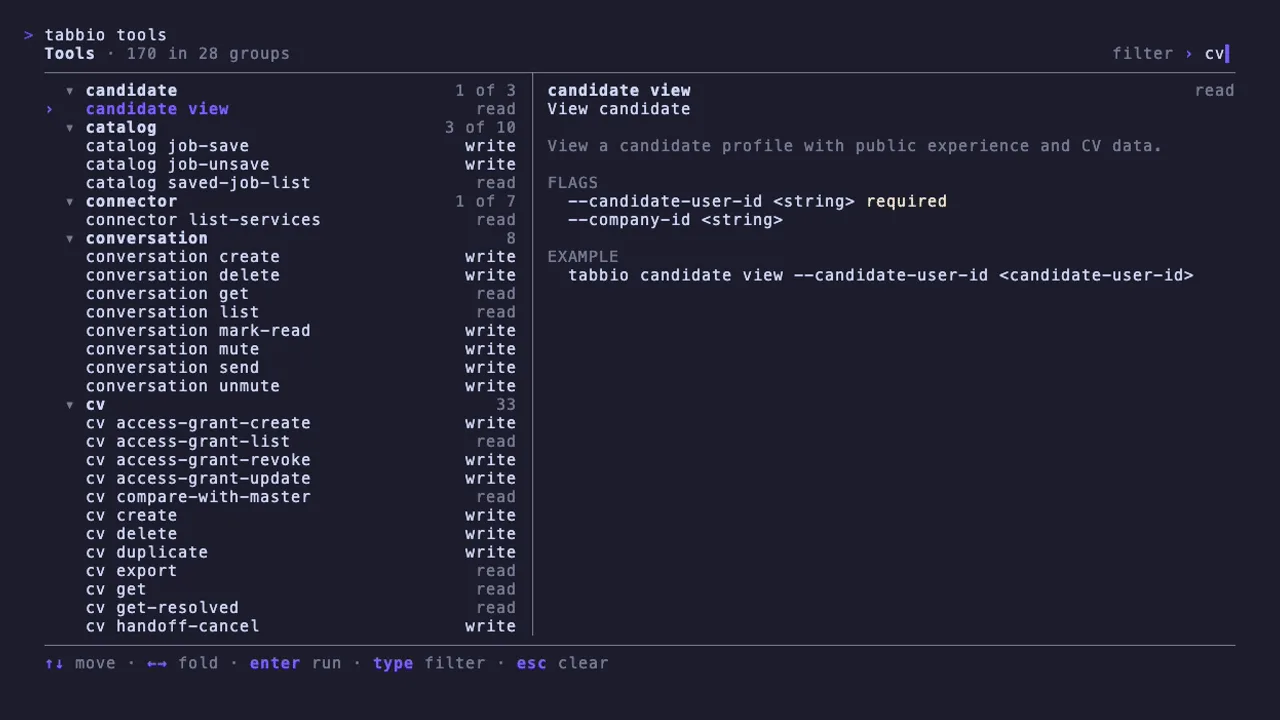
tabbio tools
Tool browser
tabbio tools groups every tool, marks each one read or write, and shows its flags and an example beside the list.
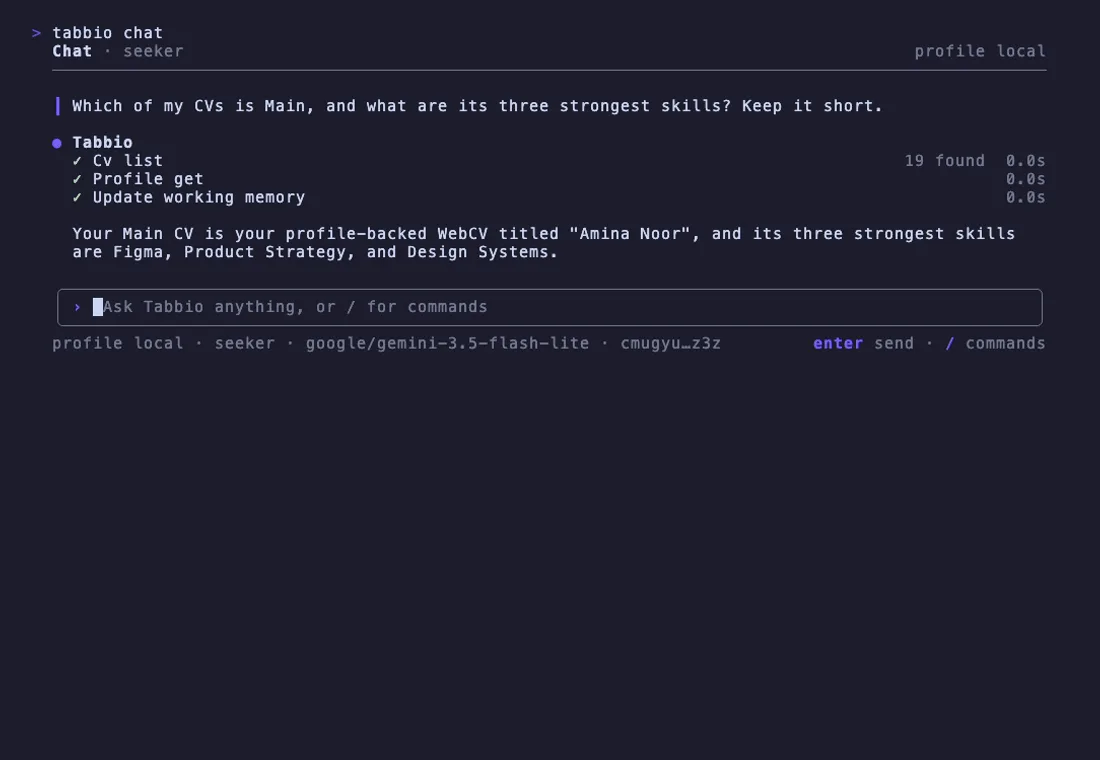
tabbio chat
Chat
A short answer from the Tabbio agent, with one line for each tool it called and how long it took.
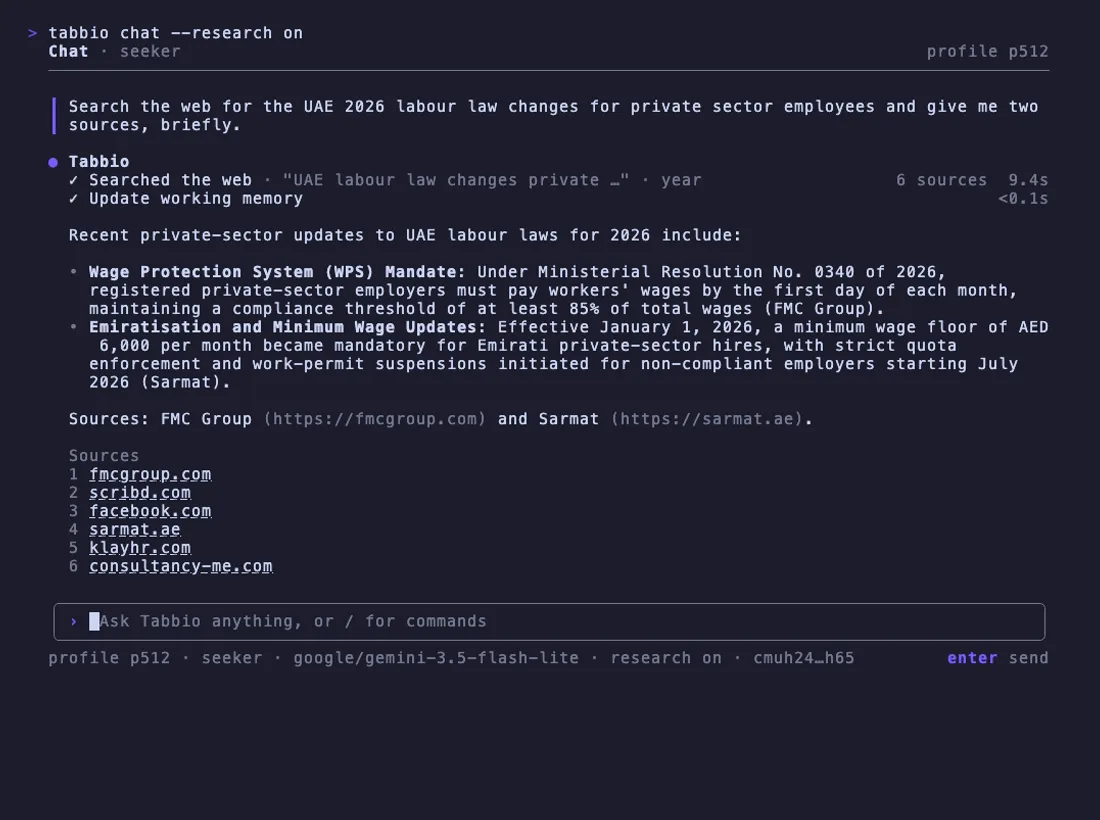
tabbio chat --research on
Research
With research on, the agent searches the web and lists its sources after the answer.
tabbio cv list
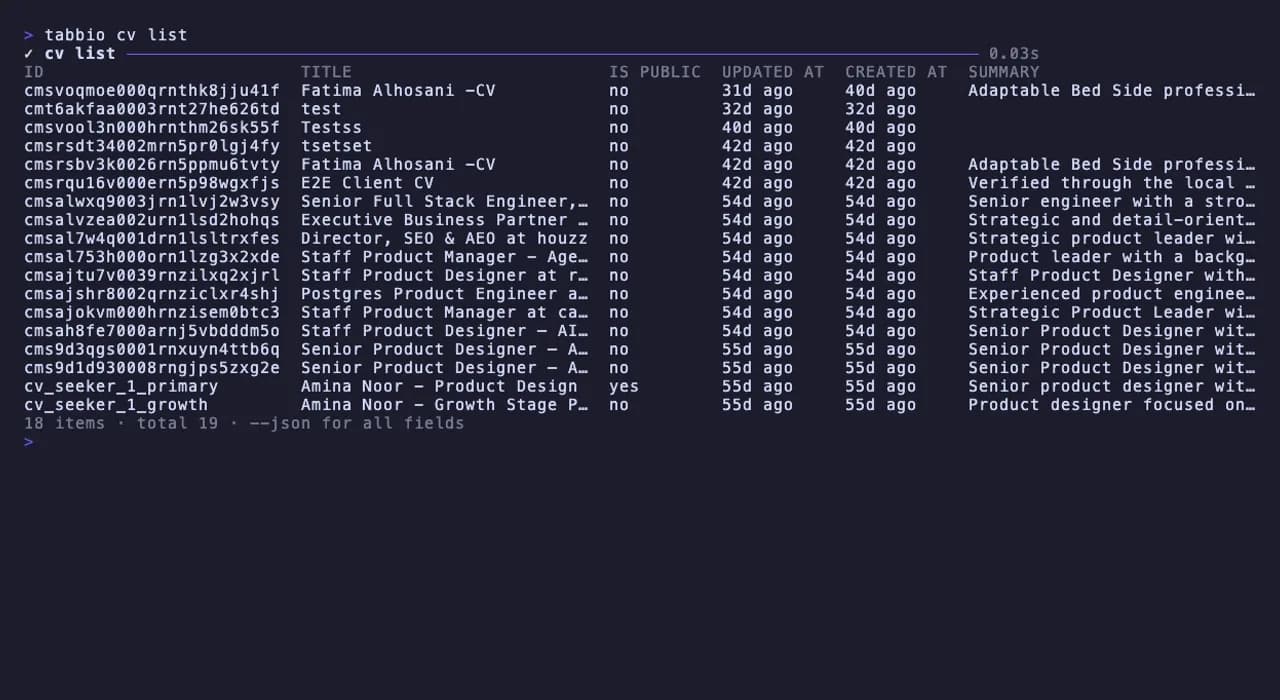
CV list
tabbio cv listprints a table in a terminal. Add--jsonfor every field.tabbio doctor
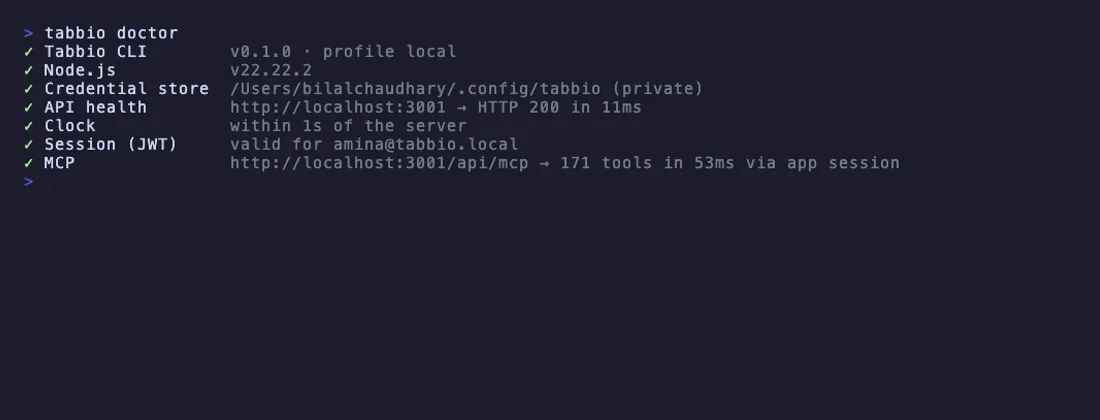
Doctor
tabbio doctorchecks Node.js, the credentials file, the API, your session, the clock and the MCP catalog.app.tabbio.com/cli/connect
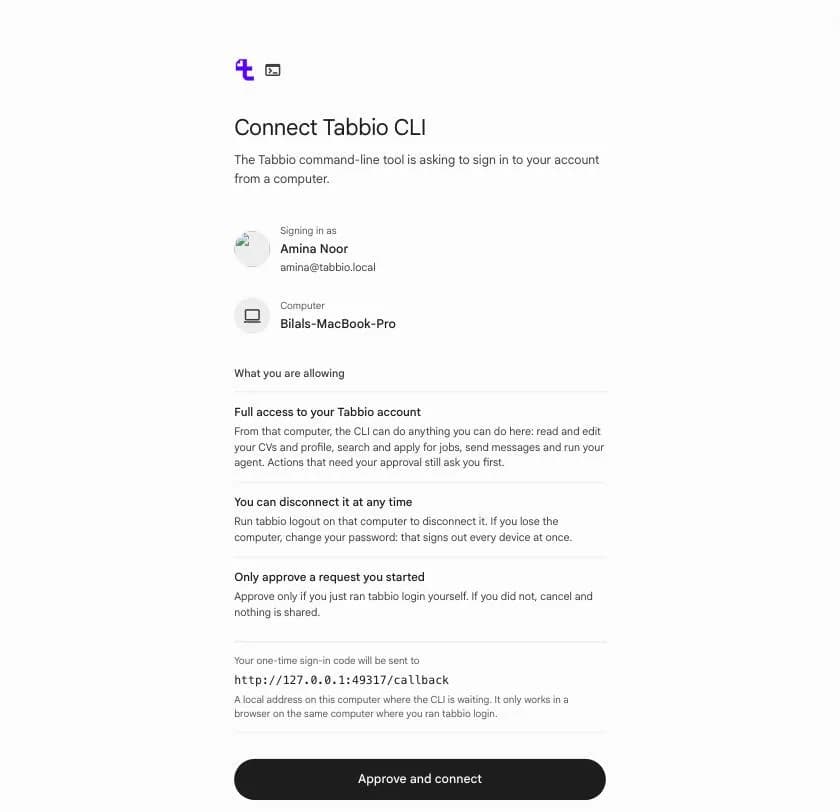
Browser sign-in
tabbio loginopens this page. It shows the account, the computer and the local address the one-time code goes to.tabbio run cv.tailor
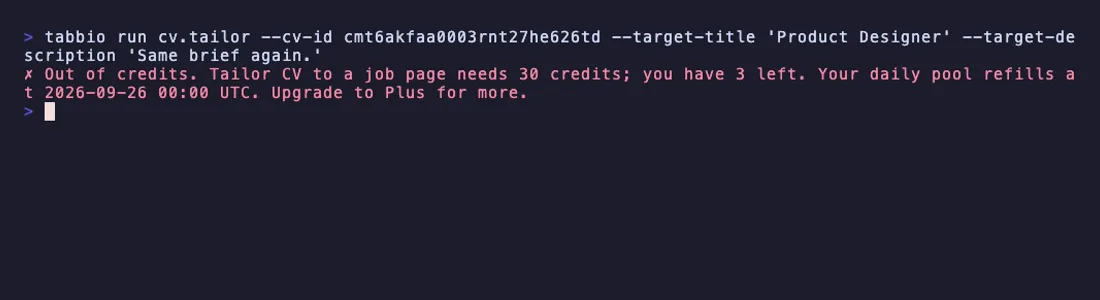
Out of credits
When the daily pool is spent, a paid tool is refused before it runs, with the cost, what is left and when the pool refills.
Get started in three steps
You need Node.js 20 or newer and a Tabbio account. The free plan is enough.
- 1
Install
Install the
tabbiocommand, or run it once with npx.npm
npm i -g @tabbio/clinpx
npx @tabbio/cli - 2
Sign in
tabbio loginopens your browser to approve this computer. On a server, add--emailto get a code by email. In CI, setTABBIO_TOKENinstead.Terminal
tabbio login - 3
Run
List your CVs, search the job catalog as JSON, or open a chat.
Terminal
tabbio cv list
tabbio catalog job-search --query "designer" --json
tabbio chat
Something off? tabbio doctor checks your setup and says what to fix.
Made for automation
Every command has a plain-text path for pipes and CI. Without a terminal, or with CI set, the CLI never draws its interactive screens and never prompts.
Exit codes
- 0
- Success
- 1
- Unexpected error
- 2
- Usage error, such as a missing flag
- 3
- Not signed in
- 4
- Not allowed by token scope, plan or credits
- 5
- Not found
- 6
- Waiting for approval
- 7
- Network error
- 8
- Server error
- 130
- Interrupted with Ctrl+C
tabbio cv list --json
{
  "data": {
    "cvs": [
      {
        "id": "cv_seeker_1_primary",
        "title": "Amina Noor - Product Design",
        "isPublic": true,
        "updatedAt": "2026-08-01T09:12:44.000Z"
      }
    ],
    "defaultCvId": "cv_seeker_1_primary",
    "total": 19
  },
  "meta": {
    "schemaVersion": 1,
    "tool": "cv.list",
    "durationMs": 31
  }
}
Output of tabbio cv list --json, trimmed to one CV. Within a schema version, fields are only added, never renamed or removed.
Works where you work
macOS
Node.js 20 or newer, in any terminal.
Linux
Desktops, servers and containers. Sign in over SSH with a code sent by email.
Windows
Node.js 20 or newer. The credentials file relies on your Windows user profile's permissions.
CI
Set TABBIO_TOKEN from your secrets. No prompts and no interactive screens.
Free to start
Free accounts get a daily credit pool, the same one the app draws from. Chat replies and AI tools such as CV tailoring spend it, and most tools make no AI call and cost nothing.
Tabbio CLI questions
- A command-line client for your Tabbio account. It turns every tool on the Tabbio MCP server into a command, streams chat with the Tabbio agent, lets you approve actions in the terminal and prints JSON for scripts. It runs anywhere Node.js 20 or newer does.
- You need a Tabbio account, and the free plan is enough. You approve the first sign-in in your browser, then the CLI works on its own. It uses the same account, data and limits as the app, so a CV you change in the terminal is the same CV in the app.
- It keeps one sign-in per profile in a credentials file only your user can read (mode 0600, in a folder set to 0700). It never prints tokens, and debug output and errors redact them.
tabbio logoutends the session on the server, and if you lose the computer, changing your password signs out every device at once. It sends no telemetry, and apart from a daily check for a new version on npm, which you can turn off, it only talks to Tabbio. - Yes. Run
tabbio login --with-tokenand paste a token from Settings, then MCP access, or setTABBIO_TOKEN. A token reaches the tools within its scope, while chat and approving actions need a browser or email sign-in. The CLI never creates a token itself, so it cannot replace the one another client uses. - Anything hard to undo or that reaches other people, such as deleting, submitting or withdrawing an application, sending a message or email, sharing a CV, publishing and starting automations. The CLI shows the tool and its arguments and waits.
--yesapproves only the actions that one command created, and only with a full sign-in. Nothing approves a whole session for you. - Yes. Store a personal token as a CI secret, expose it as
TABBIO_TOKENand add--json. With CI set, the CLI never prompts or draws its interactive screens, and exit codes tell your script what happened. Code 6 means an action is waiting for approval, and 4 means a scope, plan or credit limit. - The MCP server connects AI clients such as Claude, ChatGPT and Cursor to your account. The CLI is for you and your scripts at a terminal, with the same tools plus streaming chat and approvals. It can also bridge the server to clients that only start local servers, with
tabbio mcp serve. To connect an AI client, follow the MCP setup guide.
Install it in one line
Run it with npx, approve this computer in your browser, and your Tabbio account is in the terminal.
npx @tabbio/cli login